Sharing cookies across subdomains locally
A prod-identical local setup where cookies are shared across subdomains over real HTTPS, with zero app code changes. The trick lives in /etc/hosts + nginx.
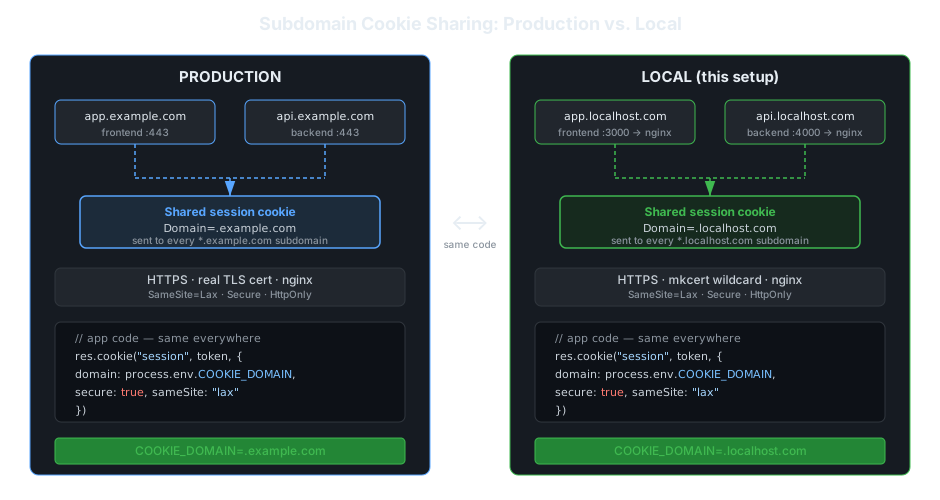
1. The problem: local env that lies about cookies
In production, a multi-service app usually lives on sibling subdomains:
app.example.com, the frontendapi.example.com, the backendauth.example.com, the auth service
They share session state through a domain cookie scoped to the parent: Domain=.example.com. The browser then attaches that cookie to every subdomain automatically. Clean, standard, done.
Locally, the typical setup is a pile of ports:
localhost:3000, frontendlocalhost:4000, api
This looks fine, but it quietly diverges from prod in ways that cost you hours:
- You can’t reproduce the parent-domain cookie scope, so you end up with a different auth code path for local vs prod (manually copying tokens, disabling
Secure, special-casingDomain). SameSite/Securebehavior can’t be tested faithfully because you’re on plain HTTP.- “Works locally, breaks in staging” becomes a recurring genre of bug.
The goal of this article: a local environment that is byte-for-byte identical in cookie behavior to prod, without a single conditional in your app.
Quick note on ports: cookies are not isolated by port. A host-only cookie set by
localhost:3000is sent tolocalhost:4000, same host. That’s actually part of the problem: barelocalhosteither over-shares (everything is the same host) or can’t share at all (you can’t create a parent scope). Neither matches a real subdomain topology.
2. Why you can’t just use .localhost
The instinct is: “I’ll use app.localhost and api.localhost and scope the cookie to .localhost.” It doesn’t work, and the reason is precise, not folklore.
Host-only vs domain cookies
- No
Domainattribute → host-only cookie. Sent only to the exact host that set it. - With
Domainattribute → domain cookie. Sent to that domain and all its subdomains.
To share across app.* and api.*, you need a domain cookie scoped to their common parent.
The Public Suffix rule (the real reason)
Per RFC 6265 and the Public Suffix List algorithm, a browser rejects a Domain cookie whose value is a public suffix (an “effective TLD”). You’re only allowed to scope a cookie to a registrable domain (eTLD + 1) or below.
Now run the algorithm on each candidate:
| Host | Effective TLD | Registrable domain (eTLD+1) | Can you set Domain=<parent>? |
|---|---|---|---|
app.localhost | localhost | app.localhost | ❌ Domain=localhost is a public suffix → rejected |
app.localhost.com | com | localhost.com | ✅ Domain=localhost.com is registrable → accepted |
That’s the whole trick in one table: localhost is treated as a single-label TLD, so there’s no parent scope to attach a shared cookie to. Add a real TLD (.com) and a legitimate parent (localhost.com) appears.
Aside, the reserved
.localhostTLD: RFC 6761 reserves.localhostto always resolve to loopback, and some browsers special-case it. Handy for resolution, useless for cookie sharing, it’s still a single label, so the rejection above still applies.
The legacy “needs two dots” lore: old Netscape-era cookie code enforced a literal dot-count rule. Modern browsers replaced it with the Public Suffix check. The dotted-domain requirement is a consequence of the PSL rule, not the rule itself.
Can JavaScript set a cross-subdomain cookie?
Yes, as long as the parent domain has a dot. document.cookie = "session=abc; Domain=.example.com; Path=/" set from app.example.com is readable from api.example.com. The browser widens the cookie scope to the registrable domain and every subdomain under it.
Two things still bite:
HttpOnlycookies cannot be set or read from JavaScript at all. If your session cookie isHttpOnly(it should be), the sharing happens server-side; JavaScript only rides along.- On localhost the same line silently fails:
Domain=.localhostis rejected becauselocalhosthas no registrable parent domain. That is the RFC 6265 rule this article is about, and the fix below works for JavaScript-set cookies too.
3. The fix: /etc/hosts + a dotted domain
Pick a dotted domain whose parent is registrable. localhost.com works well.
localhost.comis a real registered domain owned by someone else, but that’s irrelevant here, because/etc/hostsoverrides DNS and forces it to127.0.0.1on your machine. If you’d rather avoid any real domain entirely, use a reserved test TLD like*.myapp.test(.testis reserved by RFC 6761 and will never be a real site). The mechanics are identical.
Edit /etc/hosts
/etc/hosts has no wildcard support, so list each subdomain explicitly:
# /etc/hosts  (Linux/macOS) — C:\Windows\System32\drivers\etc\hosts on Windows
127.0.0.1   localhost.com
127.0.0.1   app.localhost.com
127.0.0.1   api.localhost.com
127.0.0.1   auth.localhost.com
Flush the DNS cache
# macOS
sudo dscacheutil -flushcache; sudo killall -HUP mDNSResponder
# Linux (systemd-resolved)
sudo resolvectl flush-caches
# Windows (PowerShell as admin)
ipconfig /flushdns
Verify
ping app.localhost.com        # should answer from 127.0.0.1
curl -I http://app.localhost.com:3000
Want true wildcard resolution (so any
*.localhost.comresolves without editing the file each time)? That’s thednsmasqupgrade, covered in the appendix at the bottom. For most projects, four explicit lines is simpler and enough.
4. Now cookies just work
With resolution in place, set a domain cookie scoped to the parent. This is the only “cookie-aware” line in the whole setup, and it’s the same line you’d use in prod.
Server (Express example)
res.cookie("session", token, {
  domain: ".localhost.com", // ← parent scope; in prod this is ".example.com"
  httpOnly: true,
  sameSite: "lax",
  secure: true,             // requires HTTPS — see section 5
  path: "/",
});
The raw header the browser receives:
Set-Cookie: session=...; Domain=.localhost.com; Path=/; HttpOnly; SameSite=Lax; SecureResult
A request to api.localhost.com now automatically carries the cookie set by app.localhost.com, exactly as it would across api.example.com / app.example.com in prod. The browser does the matching; your app does nothing special.
Driving toward parity: the Domain value should come from config, not a conditional
The clean pattern is a single env-driven value, identical shape in every environment:
// config
const COOKIE_DOMAIN = process.env.COOKIE_DOMAIN; // ".localhost.com" locally, ".example.com" in prod
No if (isLocal) branch anywhere. That’s the win: prod parity with zero special-casing.
5. Going further: real HTTPS locally with nginx
Notice the Secure flag above. Secure cookies are only sent over HTTPS, and SameSite=None (needed for genuine cross-site flows) requires Secure. To test cookie behavior truthfully, your local env should speak HTTPS too. nginx + a wildcard cert gets you there, and now https://app.localhost.com is genuinely close to prod.
Generate a wildcard certificate
The painless route is mkcert, which installs a trusted local CA so the browser shows no warnings:
mkcert -install
mkcert "*.localhost.com" localhost.com
# → produces _wildcard.localhost.com.pem  and  _wildcard.localhost.com-key.pem
OpenSSL alternative (no extra tooling, but you must trust the cert manually)
openssl req -x509 -nodes -newkey rsa:2048 \
  -keyout localhost.com-key.pem \
  -out localhost.com.pem \
  -days 825 \
  -subj "/CN=*.localhost.com" \
  -addext "subjectAltName=DNS:*.localhost.com,DNS:localhost.com"
Then add the resulting cert to your OS/browser trust store.
nginx as a TLS-terminating reverse proxy
nginx listens on 443, terminates TLS, and proxies each subdomain to the right local port:
# /etc/nginx/conf.d/localhost.com.conf
upstream frontend { server 127.0.0.1:3000; }
upstream backend  { server 127.0.0.1:4000; }

server {
    listen 443 ssl;
    server_name app.localhost.com;

    ssl_certificate     /path/to/_wildcard.localhost.com.pem;
    ssl_certificate_key /path/to/_wildcard.localhost.com-key.pem;

    location / {
        proxy_pass http://frontend;
        proxy_set_header Host              $host;
        proxy_set_header X-Forwarded-Proto $scheme;
        proxy_set_header X-Real-IP         $remote_addr;
    }
}

server {
    listen 443 ssl;
    server_name api.localhost.com;

    ssl_certificate     /path/to/_wildcard.localhost.com.pem;
    ssl_certificate_key /path/to/_wildcard.localhost.com-key.pem;

    location / {
        proxy_pass http://backend;
        proxy_set_header Host              $host;
        proxy_set_header X-Forwarded-Proto $scheme;
        proxy_set_header X-Real-IP         $remote_addr;
    }
}
sudo nginx -t && sudo nginx -s reloadNow https://app.localhost.com and https://api.localhost.com are live, trusted, sharing a Secure cookie on .localhost.com. That’s preprod parity on your laptop.
If your backend relies on event-driven infrastructure, the same prod-identical philosophy extends there too: testing Lambda functions and EventBridge rules locally without mocks keeps the same class of “works locally, breaks in staging” bug from creeping in through the infrastructure layer.
Important for Express behind a proxy: set
app.set("trust proxy", 1)soSecurecookies andreq.protocolrespect theX-Forwarded-Protoheader nginx sends.
6. The full picture
| Production | Local (this setup) | |
|---|---|---|
| Frontend host | app.example.com | app.localhost.com |
| API host | api.example.com | api.localhost.com |
| Cookie scope | .example.com | .localhost.com |
| Transport | HTTPS | HTTPS (nginx + mkcert) |
| App code | , | identical, no branches |
The only things that differ between environments are values in config (COOKIE_DOMAIN, base URLs), never logic.
7. Gotchas & troubleshooting
- Cookie not being set? Check the leading-dot
Domain, confirm you’re on HTTPS ifSecureis set, and confirm the request host actually matches the cookie’s domain. - CORS with credentials: cross-subdomain XHR/fetch needs
withCredentials: true(client),Access-Control-Allow-Credentials: true(server), and a specificAccess-Control-Allow-Origin, the*wildcard is forbidden when credentials are involved. SameSite:Laxcovers most same-site subdomain flows. UseNoneonly for genuine cross-site contexts, and remember it mandatesSecure(hence section 5).- DNS cache: if a new subdomain won’t resolve, flush the cache (section 3) or restart the browser.
- Express behind nginx: without
trust proxy,Securecookies silently won’t be sent. - Stale certs: re-run
mkcert -installif the browser distrusts the CA after an OS update.
Bonus aside: making it work on mobile
Native apps (and some webviews) don’t persist and replay cookies the way a browser does, so the elegant browser story above falls apart on mobile. A compact workaround that keeps server behavior identical:
- Parse
Set-Cookiewith the same library Express uses, thecookienpm package, so parsing is byte-identical to the backend’s expectations. - Persist everything (e.g. secure storage /
AsyncStorage). - Re-inject on every outgoing request via an axios request interceptor,
axios.interceptors.request.use().
import cookie from "cookie";
import axios from "axios";

// Capture: parse and store Set-Cookie from responses
axios.interceptors.response.use((res) => {
  const setCookie = res.headers["set-cookie"];
  if (setCookie) {
    const jar = setCookie.map((c) => cookie.parse(c));
    storage.saveCookies(jar); // your persistence layer
  }
  return res;
});

// Replay: inject stored cookies on every request
axios.interceptors.request.use((config) => {
  const stored = storage.loadCookies(); // { session: "...", ... }
  config.headers.Cookie = Object.entries(stored)
    .map(([k, v]) => cookie.serialize(k, v))
    .join("; ");
  return config;
});
Using the same parser as the server avoids the subtle “it parsed differently on mobile” bugs. Keep this layer thin, it’s a bridge for environments without a real cookie jar, not a replacement for one.
Conclusion
Production-grade cookie behavior locally comes down to three moves: dotted subdomains in /etc/hosts, a parent-scoped Domain, and nginx for real HTTPS. The payoff is a local environment that stops lying to you, same hosts shape, same cookie scope, same transport, same code. The class of “only breaks in staging” auth bugs largely disappears.
Appendix: wildcard resolution with dnsmasq
If you add subdomains often and don’t want to keep editing /etc/hosts, dnsmasq resolves an entire wildcard to loopback:
# dnsmasq.conf
address=/localhost.com/127.0.0.1
Combined with the wildcard cert from section 5, every *.localhost.com you invent just works, no per-subdomain edits, no new certs. Setup differs by OS (resolver config on macOS via /etc/resolver/, NetworkManager/systemd-resolved on Linux), so treat this as the “level up” once the explicit-entry version is paying off.