Testing Lambda + EventBridge locally
How to test AWS Lambda functions and EventBridge rules locally using SAM, LocalStack, and docker-compose. No cloud deployment needed.
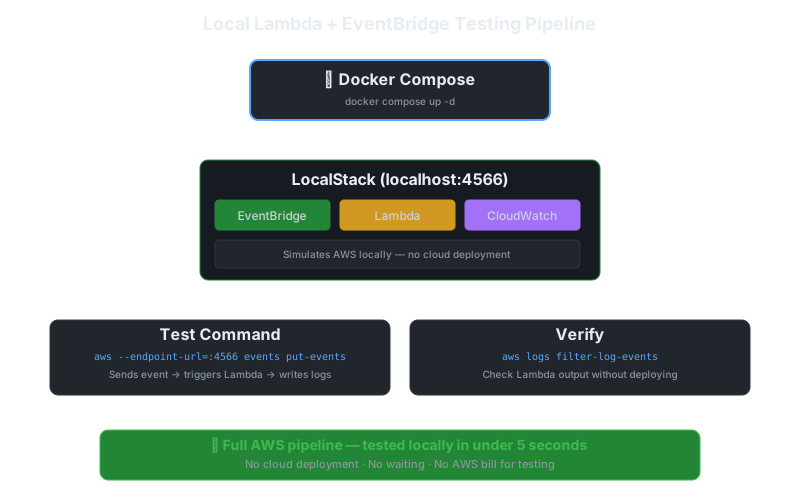
You change one line in a Lambda. You deploy to AWS. You wait 30 seconds. You test. It fails. You change one line. You deploy. You wait. This cycle is slow, expensive, and unnecessary.
Here’s how to test Lambda + EventBridge entirely on your laptop.
The Setup: docker-compose + LocalStack
The simplest approach uses LocalStack, a full AWS cloud stack running in Docker.
# docker-compose.yml
version: "3.8"
services:
  localstack:
    image: localstack/localstack:3.4
    ports:
      - "4566:4566"            # LocalStack Gateway
      - "4510-4559:4510-4559"  # external services port range
    environment:
      - SERVICES=lambda,events,logs,iam,sts
      - DEFAULT_REGION=eu-west-3
      - LAMBDA_EXECUTOR=docker-reuse
      - LAMBDA_REMOTE_DOCKER=false
      - DOCKER_HOST=unix:///var/run/docker.sock
    volumes:
      - "/var/run/docker.sock:/var/run/docker.sock"
      - "./localstack-init:/etc/localstack/init/ready.d"
Start it:
docker compose up -dCreating a Lambda Locally
# Package your function
cd src/handler && zip -r ../../function.zip . && cd ..

# Create the Lambda
aws --endpoint-url=http://localhost:4566 lambda create-function \
  --function-name process-order \
  --runtime python3.12 \
  --handler handler.lambda_handler \
  --zip-file fileb://function.zip \
  --role arn:aws:iam::000000000000:role/lambda-role \
  --timeout 30 \
  --memory-size 256

# Invoke it
aws --endpoint-url=http://localhost:4566 lambda invoke \
  --function-name process-order \
  --payload '{"orderId": "12345", "action": "process"}' \
  --cli-binary-format raw-in-base64-out \
  output.json

cat output.json
Setting Up EventBridge Rules
# Create an event bus
aws --endpoint-url=http://localhost:4566 events create-event-bus \
  --name order-events

# Create a rule
aws --endpoint-url=http://localhost:4566 events put-rule \
  --name order-created-rule \
  --event-bus-name order-events \
  --event-pattern '{"source": ["order.service"], "detail-type": ["Order Created"]}'

# Add the Lambda as a target
aws --endpoint-url=http://localhost:4566 events put-targets \
  --rule order-created-rule \
  --event-bus-name order-events \
  --targets "Id"="1","Arn"="arn:aws:lambda:eu-west-3:000000000000:function:process-order"
Testing the Full Flow
# Send a test event
aws --endpoint-url=http://localhost:4566 events put-events \
  --entries '[
    {
      "Source": "order.service",
      "DetailType": "Order Created",
      "Detail": "{\"orderId\": \"ORD-001\", \"amount\": 99.99, \"customer\": \"alice@example.com\"}",
      "EventBusName": "order-events"
    }
  ]'

# Check Lambda logs
aws --endpoint-url=http://localhost:4566 logs filter-log-events \
  --log-group-name /aws/lambda/process-order \
  --limit 10
Automated Testing with pytest
# tests/test_process_order.py
import json
import boto3
import pytest

@pytest.fixture
def lambda_client():
    return boto3.client(
        "lambda",
        endpoint_url="http://localhost:4566",
        region_name="eu-west-3",
        aws_access_key_id="test",
        aws_secret_access_key="test",
    )

@pytest.fixture
def events_client():
    return boto3.client(
        "events",
        endpoint_url="http://localhost:4566",
        region_name="eu-west-3",
        aws_access_key_id="test",
        aws_secret_access_key="test",
    )

def test_process_order_success(lambda_client):
    response = lambda_client.invoke(
        FunctionName="process-order",
        Payload=json.dumps({
            "orderId": "ORD-001",
            "action": "process"
        }),
    )

    payload = json.loads(response["Payload"].read())
    assert response["StatusCode"] == 200
    assert payload["status"] == "processed"

def test_eventbridge_triggers_lambda(events_client, lambda_client):
    # Send event
    events_client.put_events(Entries=[{
        "Source": "order.service",
        "DetailType": "Order Created",
        "Detail": json.dumps({"orderId": "ORD-002", "amount": 50.0}),
        "EventBusName": "order-events",
    }])

    # Wait for async processing
    import time; time.sleep(2)

    # Verify via CloudWatch Logs
    logs = boto3.client("logs", endpoint_url="http://localhost:4566",
                         region_name="eu-west-3",
                         aws_access_key_id="test",
                         aws_secret_access_key="test")

    events = logs.filter_log_events(
        logGroupName="/aws/lambda/process-order",
        limit=5,
    )

    log_messages = [e["message"] for e in events["events"]]
    assert any("ORD-002" in msg for msg in log_messages)
Run it:
docker compose up -d
./scripts/setup-localstack.sh   # create functions, rules, targets
pytest tests/ -v
Alternative: AWS SAM Local
If you’re already using SAM:
# Start local API and Lambda runtime
sam local start-lambda --docker-network host

# Invoke
sam local invoke process-order -e events/order-created.json

# Test EventBridge pattern matching
sam local generate-event events put-events \
  --source order.service \
  --detail-type "Order Created" \
  --detail '{"orderId": "12345"}'
SAM is lighter than LocalStack but only handles Lambda + API Gateway well. For EventBridge, LocalStack is better.
What LocalStack Doesn’t Simulate Well
Be aware of the gaps:
| Feature | LocalStack Support | Gotcha |
|---|---|---|
| Lambda invocation | ✅ Good | Cold starts not simulated |
| EventBridge rules | ✅ Good | Some pattern matching edge cases differ |
| IAM permissions | ⚠️ Partial | Doesn’t enforce all policies |
| Lambda concurrency | ❌ No | No throttling simulation |
| VPC networking | ⚠️ Partial | ENI creation differs |
| CloudWatch metrics | ⚠️ Basic | Some metric dimensions missing |
For integration tests, LocalStack is fine. For performance or concurrency testing, you need the real cloud.
The Workflow
1. Write Lambda code
2. docker compose up -d          # start LocalStack
3. ./scripts/setup.sh            # deploy functions + rules locally
4. pytest tests/ -v              # run tests
5. docker compose down           # clean up
Total cycle time: under 5 seconds per test run. No cloud deployment. No waiting. No AWS bill for testing.
When LocalStack Isn’t Enough
This setup covers logic, event routing, and integration testing, the bulk of what slows down a deploy-to-test loop. It does not replace a staging environment if your Lambda depends on:
- IAM permission edge cases (LocalStack is permissive by default)
- Real service quotas or throttling behavior
- Cross-region or cross-account event routing
For a small team shipping a handful of Lambdas, the 10-minute setup pays for itself within the first afternoon. For anything touching IAM policy correctness, budget a staging deploy before merging, no local tool replaces that check.
Local testing catches the easy failures. For the silent ones that only show up in production, see Debugging is more important than features for the monitoring setup that catches what local tests miss.