Social media link previews in React: server-side user-agent detection
How to handle Open Graph meta tags for LinkedIn, Google, and Discord previews in a React SPA using server-side user-agent detection with nginx or .htaccess.
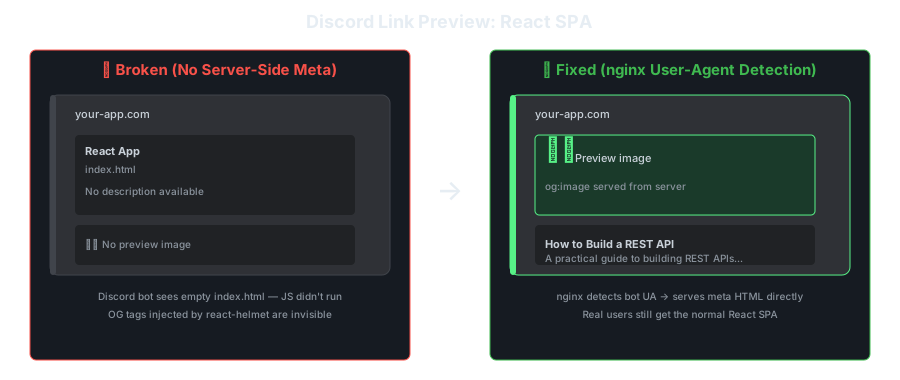
You share a link to your React app on Discord. Instead of a nice preview with title, description, and image, you get nothing. Or worse, a generic “React App” card with no useful information.
The problem: React SPAs render everything client-side. Social media crawlers don’t execute JavaScript. They hit your server, get an empty <head>, and give up.
Why Social Previews Break in React
When Discord, LinkedIn, Slack, or Google crawl a URL, they:
- Send an HTTP request with a specific User-Agent
- Parse the HTML
<head>for OG/meta tags - Display the preview
They do not run JavaScript. So your beautifully rendered React app with react-helmet meta tags? Invisible to them.
The crawler sees:
<!DOCTYPE html>
<html>
<head>
  <title>React App</title>
  <!-- react-helmet tags haven't rendered yet -->
</head>
<body>
  <div id="root"></div>
  <script src="/static/js/main.js"></script>
</body>
</html>
The Solution: Server-Side User-Agent Detection
The idea is simple: when a crawler requests a page, serve pre-rendered HTML with the correct meta tags. When a real user requests it, serve the normal SPA.
Crawler User-Agents to Detect
| Platform | User-Agent contains |
|---|---|
LinkedInBot | |
| Discord | Discordbot |
| Twitter/X | Twitterbot |
| Slack | Slackbot |
Googlebot | |
facebookexternalhit |
Option 1: nginx Reverse Proxy
# /etc/nginx/conf.d/preview.conf

# Map user-agents to a variable
map $http_user_agent $is_crawler {
    default                 0;
    "~*LinkedInBot"         1;
    "~*Discordbot"          1;
    "~*Twitterbot"          1;
    "~*Slackbot"            1;
    "~*Googlebot"           1;
    "~*facebookexternalhit" 1;
    "~*WhatsApp"            1;
}

server {
    listen 80;
    server_name myapp.com;
    root /var/www/myapp/build;

    location / {
        if ($is_crawler) {
            # Rewrite to a server-side endpoint that returns meta-tagged HTML
            rewrite ^ /preview$uri last;
        }

        # Normal SPA serving
        try_files $uri /index.html;
    }

    location /preview {
        internal;
        proxy_pass http://localhost:3001;
        proxy_set_header Host $host;
        proxy_set_header X-Real-URI $request_uri;
    }
}
The preview server (Node/Express):
// preview-server.js
const express = require('express');
const { getMetaForPath } = require('./meta-registry');

const app = express();

app.get('*', (req, res) => {
    const path = req.headers['x-real-uri'] || req.path;
    const meta = getMetaForPath(path);

    const html = `<!DOCTYPE html>
<html lang="en">
<head>
    <meta charset="utf-8" />
    <meta name="viewport" content="width=device-width, initial-scale=1" />

    <!-- Primary Meta Tags -->
    <title>${meta.title}</title>
    <meta name="title" content="${meta.title}" />
    <meta name="description" content="${meta.description}" />

    <!-- Open Graph / Facebook -->
    <meta property="og:type" content="website" />
    <meta property="og:url" content="https://myapp.com${path}" />
    <meta property="og:title" content="${meta.title}" />
    <meta property="og:description" content="${meta.description}" />
    <meta property="og:image" content="${meta.image}" />

    <!-- Twitter -->
    <meta property="twitter:card" content="summary_large_image" />
    <meta property="twitter:url" content="https://myapp.com${path}" />
    <meta property="twitter:title" content="${meta.title}" />
    <meta property="twitter:description" content="${meta.description}" />
    <meta property="twitter:image" content="${meta.image}" />
</head>
<body>
    <p>${meta.description}</p>
</body>
</html>`;

    res.setHeader('Content-Type', 'text/html');
    res.send(html);
});

app.listen(3001, () => console.log('Preview server on :3001'));
Option 2: Apache .htaccess
# .htaccess
RewriteEngine On

# Detect crawlers
RewriteCond %{HTTP_USER_AGENT} (LinkedInBot|Discordbot|Twitterbot|Slackbot|Googlebot|facebookexternalhit|WhatsApp) [NC]

# Don't rewrite if already going to preview
RewriteCond %{REQUEST_URI} !^/preview/

# Rewrite to preview endpoint
RewriteRule ^(.*)$ /preview/$1 [L]

# Normal SPA fallback
RewriteCond %{REQUEST_FILENAME} !-f
RewriteCond %{REQUEST_FILENAME} !-d
RewriteRule . /index.html [L]
Option 3: Express Middleware (No nginx/Apache Changes)
If you’re already running a Node server:
// server.js
const express = require('express');
const path = require('path');
const { getMetaForPath } = require('./meta-registry');

const CRAWLER_AGENTS = [
    'LinkedInBot',
    'Discordbot',
    'Twitterbot',
    'Slackbot',
    'Googlebot',
    'facebookexternalhit',
    'WhatsApp',
];

function isCrawler(userAgent) {
    return CRAWLER_AGENTS.some(agent =>
        userAgent.toLowerCase().includes(agent.toLowerCase())
    );
}

const app = express();

// Crawler detection middleware, must be before static serving
app.use((req, res, next) => {
    if (isCrawler(req.get('User-Agent') || '')) {
        const meta = getMetaForPath(req.path);

        return res.send(`<!DOCTYPE html>
<html lang="en">
<head>
    <meta charset="utf-8" />
    <title>${meta.title}</title>
    <meta name="description" content="${meta.description}" />
    <meta property="og:type" content="website" />
    <meta property="og:url" content="https://myapp.com${req.path}" />
    <meta property="og:title" content="${meta.title}" />
    <meta property="og:description" content="${meta.description}" />
    <meta property="og:image" content="${meta.image}" />
    <meta property="twitter:card" content="summary_large_image" />
    <meta property="twitter:title" content="${meta.title}" />
    <meta property="twitter:description" content="${meta.description}" />
    <meta property="twitter:image" content="${meta.image}" />
</head>
<body><p>${meta.description}</p></body>
</html>`);
    }
    next();
});

// Normal SPA serving
app.use(express.static(path.join(__dirname, 'build')));
app.get('*', (req, res) => {
    res.sendFile(path.join(__dirname, 'build', 'index.html'));
});

app.listen(3000);
The Meta Registry
The missing piece: mapping routes to meta data.
// meta-registry.js
const metaMap = {
    '/': {
        title: 'MyApp Home',
        description: 'The best app for doing things.',
        image: 'https://myapp.com/og/home.png',
    },
    '/blog/:slug': {
        title: ({ slug }) => `${slug} | MyApp Blog`,
        description: ({ slug }) => `Read about ${slug}.`,
        image: 'https://myapp.com/og/blog.png',
    },
    '/product/:id': {
        title: ({ id }) => `Product ${id} | MyApp`,
        description: ({ id }) => `Check out product ${id}.`,
        image: ({ id }) => `https://myapp.com/og/products/${id}.png`,
    },
};

function getMetaForPath(path) {
    // Simple matching, use a proper router for production
    for (const [pattern, meta] of Object.entries(metaMap)) {
        if (matchPath(pattern, path)) {
            const params = extractParams(pattern, path);
            return {
                title: typeof meta.title === 'function' ? meta.title(params) : meta.title,
                description: typeof meta.description === 'function' ? meta.description(params) : meta.description,
                image: typeof meta.image === 'function' ? meta.image(params) : meta.image,
            };
        }
    }

    return {
        title: 'MyApp',
        description: 'The best app for doing things.',
        image: 'https://myapp.com/og/default.png',
    };
}
Testing Your Previews
# Test as Discord
curl -A "Discordbot/2.0" https://myapp.com/blog/my-post | grep -E "og:|twitter:"

# Test as LinkedIn
curl -A "LinkedInBot/1.0" https://myapp.com/product/42 | grep -E "og:|twitter:"

# Test as a normal browser (should get the SPA)
curl -A "Mozilla/5.0" https://myapp.com/blog/my-post | grep "<div id=\"root\">"
Or use the platform-specific debuggers:
- LinkedIn: https://www.linkedin.com/post-inspector/
- Twitter/X: https://cards-dev.twitter.com/validator
- Facebook: https://developers.facebook.com/tools/debug/
- Discord: No debugger, just send a link and check
The Bottom Line
Social media previews for React SPAs require server-side rendering of meta tags. The pattern is always the same:
- Detect crawler User-Agent
- Serve pre-rendered HTML with OG/Twitter meta tags
- Serve normal SPA for real users
nginx reverse proxy is the cleanest approach. It keeps the preview logic separate from your app code. Express middleware is the simplest if you’re already running a Node server.
The key insight: the meta tags need to exist in the initial HTML response, not be injected by JavaScript. Whatever approach you choose, that’s the constraint.