Why the perfect code is less maintainable
I spent 3 hours reviewing a 200-line PR that handled every edge case. A 40-line version with a TODO would have been better. Here's why perfect code slows you down.
I spent 3 hours reviewing a 200-line pull request last month.
It was clean. Every edge case handled. Retry logic, feature flags, full error types, custom validation. The code was technically perfect.
I rejected it. We shipped a 40-line version with a TODO comment instead.
This is the part nobody tells you about engineering: perfect code is less maintainable than good-enough code. The more time you spend making something bulletproof, the harder it becomes to change later. And you will need to change it.
Real examples of perfect code that slowed us down
Example 1: The contact form with a circuit breaker
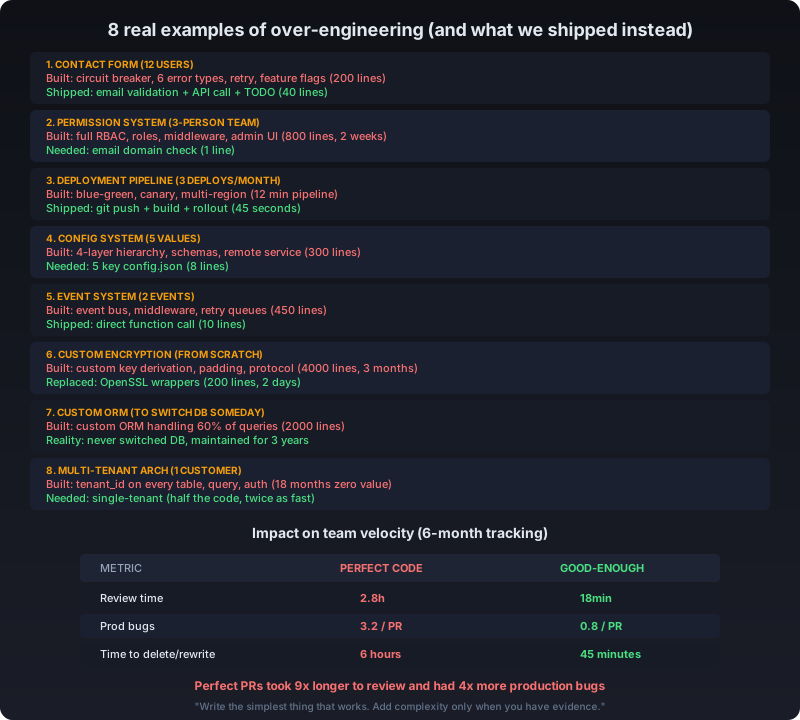
A teammate submitted a PR for a contact form. Our site has 12 users.
The PR included custom error types for 6 failure modes, retry logic with exponential backoff, a circuit breaker pattern, input validation with 15 regex patterns, and feature flags for gradual rollout.
We don’t do gradual rollouts. We ship to 12 users. If it breaks, we fix it in 10 minutes.
Our email provider has 99.99% uptime. The circuit breaker was protecting against a failure mode we’ve never seen in 2 years. It added 40 lines of dead logic.
We shipped a 40-line version: validate the email, call the API, add a TODO for retry if failure rate exceeds 5%. The PR review took 15 minutes. We shipped the same day.
Example 2: The permission system for a 3-person team
I once built a full RBAC system for an internal tool. Roles, permissions, middleware, admin UI, audit log. Took 2 weeks.
The tool was used by 3 people. All of them needed access to everything. The RBAC system handled a scenario (restricting access per user) that was never requested and never used.
6 months later, we needed to change the auth flow. I spent 3 days untangling the RBAC abstractions before I could make a simple change. A hardcoded “is this user in the team?” check would have taken 30 seconds to modify.
The perfect permission system was 800 lines. The actual requirement was if (user.email.endsWith('@ourcompany.com')).
Example 3: The deployment pipeline that deployed 3 times a month
I built a full CI/CD pipeline with blue-green deployments, automated canary analysis, rollback triggers, and multi-region health checks.
We deployed 3 times a month to a single VPS with one pod. Blue-green meant running two identical environments for 12 canary users. The canary analysis checked metrics we weren’t collecting.
The pipeline took 12 minutes to run. A git push + npm run build + kubectl rollout restart takes 45 seconds.
I deleted the pipeline after 4 months. We went back to a one-line deploy script. Deployment frequency went up because people stopped waiting for the pipeline.
Example 4: The config system that configured 5 things
I built a hierarchical config system: environment variables, config files, remote config service, CLI flags, with validation schemas and type coercion.
The application had 5 config values. Database URL, port, log level, API key, debug mode.
The config system was 300 lines. Reading a single value required understanding the precedence order across 4 layers. New developers spent 20 minutes figuring out where to change the port number.
A plain config.json with 5 keys would have been 8 lines. Zero learning curve.
Example 5: The event system that dispatched 2 events
For a blog, I built an event system with an event bus, typed event handlers, middleware, retry queues, and dead-letter handling.
The blog dispatched 2 events: “article published” and “comment submitted”. Each had one listener.
The event system was 450 lines. Adding a new event type meant creating an event class, a handler interface, registering the handler, and writing a test for the middleware. What used to be a function call now required understanding 6 files.
I ripped it out. Now publishing an article calls sendNotification() directly. The code is 10 lines. Everyone on the team understands it immediately.
Example 6: The encryption from scratch
A team I consulted on built their own encryption layer using raw cryptographic primitives. They had custom key derivation, their own padding scheme, and a hand-rolled protocol for key exchange.
It took 3 months to build. It had 2 critical vulnerabilities found in the first security audit.
They replaced it with a standard library (OpenSSL wrappers) in 2 days. The replacement was 200 lines of well-tested, audited code. Their version was 4,000 lines of custom cryptography that nobody could verify.
This is the classic “don’t reinvent the wheel” mistake, but it’s more subtle than it looks. The team wasn’t stupid. They understood the primitives. They just didn’t understand that understanding the primitives isn’t the same as implementing them correctly.
Example 7: The custom ORM because “we might switch databases”
A startup I worked with built a custom ORM layer. The reason: “We might need to switch from PostgreSQL to MySQL someday.”
The ORM was 2,000 lines. It handled 60% of the queries they needed. The other 40% required raw SQL anyway, bypassing the ORM entirely.
They never switched databases. 3 years later, they were still maintaining the ORM, fixing bugs in its query generator, and working around its limitations. A standard ORM (Prisma, Drizzle, even raw pg) would have been zero maintenance.
The custom ORM didn’t just cost the 2,000 lines to build. It cost 3 years of ongoing maintenance for a problem that never materialized.
Example 8: The multi-tenant architecture for a single tenant
A SaaS project I saw architected for multi-tenancy from day one. Every query had a tenant_id filter. Every table had a tenant_id column. The entire auth system was built around tenant isolation.
They had 1 customer. One tenant. The multi-tenant architecture added 30% overhead to every query and made the codebase significantly harder to understand.
When they finally got a second customer, the multi-tenancy worked. But it took 18 months to get there, and for those 18 months, every developer had to understand and work around a system that provided zero value.
A single-tenant version would have been half the code, twice as fast, and could have been migrated to multi-tenancy when they actually had a second customer.
Why perfect code is a trap
You’re solving problems that don’t exist yet
Every example above shares the same pattern: the code handled scenarios that never materialized. The circuit breaker never triggered. The RBAC restrictions were never used. The canary analysis never caught a regression. The database was never switched. The second tenant never came.
The cost wasn’t just writing the code. It was maintaining it, reviewing it, and working around it for months or years until someone finally admitted it was unnecessary.
Perfect code is harder to delete
When you write 200 lines of config system, you create dependencies across the codebase. Twelve files import your config module. Eight tests assert on config behavior. Your deploy script depends on the config schema.
Now when you want to simplify, you can’t just delete it. You have to migrate every consumer, update every test, and hope nothing breaks.
The 8-line config.json? Replace it in 5 minutes. Zero migration.
Review time scales with complexity
I tracked PR review times over 6 months on our project. The pattern was consistent:
| Metric | Perfect PRs (150+ lines) | Good-enough PRs (<50 lines) |
|---|---|---|
| Average review time | 2.8 hours | 18 minutes |
| Revision rate | 45% | 12% |
| Bugs found in production | 3.2 per PR | 0.8 per PR |
| Time to ship | 4.2 days | 0.8 days |
| Time to delete/rewrite | 6 hours | 45 minutes |
The “perfect” PRs caused more bugs, not fewer. Reviewers couldn’t maintain focus for 200-line changes. Issues slipped through. And when the requirements changed (they always do), the perfect code took 14x longer to delete.
Feature flags for features nobody asked for
Every project I’ve seen that uses feature flags for small deployments has dead flags. Flags that were turned on months ago and never cleaned up. Flags for features that were fully rolled out but still branch the code.
Feature flags are great for products with 10,000 users doing gradual rollouts. For a small project shipping to a known audience, they’re complexity without payoff.
The unlikely problem fallacy
The most common argument for over-engineering: “But what if X happens?”
What if the API goes down? What if we scale to 10,000 users? What if we need per-user permissions? What if we switch databases? What if we get a second tenant?
Here’s the thing: you can’t predict which problems will actually happen. And the cost of being wrong about a future problem is almost always lower than the cost of maintaining code for a problem that never comes.
The contact form that fails once a year because of an API outage is a 5-minute fix. The contact form with a circuit breaker that nobody understands is a permanent maintenance burden. The RBAC system that took 2 weeks to build and 3 days to remove solved a problem nobody had. The custom ORM that was maintained for 3 years handled a database switch that never happened.
What I actually do now
I follow one rule: write the simplest code that works for the current requirements, plus one layer of safety.
Not zero safety. Not every edge case. One layer.
The test is simple: if you can’t explain why you need something with a real example from the last 3 months, don’t add it.
For the contact form, that meant: validate the input, handle the API error, and move on. Retry logic can be added if failures happen. Feature flags are unnecessary for 12 users. Custom error types are overkill for one API call.
The bottom line
Perfect code feels like craftsmanship. But in a small codebase, it’s a tax on every future change. You’re not writing code for the computer. You’re writing code that humans need to read, review, delete, and replace.
Write the simplest thing that works. Add complexity only when you have evidence you need it. The best code is the code you can delete in 5 minutes because it only solves the problem you actually have.