Debugging is more important than features
My blog returned 404 on every page at 2 AM. I had zero visibility into why. Here is the debugging infrastructure I wish I had set up from day one.
My blog returned 404 on every page at 2 AM.
No error. No alert. No log entry. Just blank pages for every visitor until I manually checked the site 6 hours later.
The cause: a PVC hostPath volume silently lost all HTML files after a redeploy. Only _astro assets and images remained. The Caddy container was running fine. Health checks passed. Nothing was “down.”
I had zero visibility into production. And I learned more debugging from that one incident than from the previous 6 months of feature work.
The silent failure is the worst kind. Your site is “up” but serving broken content. Your API returns 200 but wrong data. Your deploy succeeded but the new code never actually loaded. These are the failures that burn hours because you do not even know to look.
Debugging infrastructure is more important than features. Every hour you spend on observability saves 10 hours of debugging at 2 AM. Here is what I actually use.
What I had (nothing)
Before the incident, my production “monitoring” was curl.
curl -s -o /dev/null -w "%{http_code}" http://my-site/
200
That tells you the HTTP layer works. It does not tell you if pages load correctly, if assets exist, if the right content is served, or if a silent corruption ate your HTML files.
I did not have:
- Structured logs (I was using console.log)
- Request IDs to trace a user journey
- Any log aggregation (kubectl logs, good luck)
- Health checks beyond “is the process running”
- Uptime monitoring
- Error tracking
- Alerting of any kind
The site was a black box. It either worked or it did not, and I only knew which one when I manually looked.
The silent failures I have actually seen
Every one of these happened on a real small project. Every one took hours to diagnose because the monitoring was “the site returns 200, so it must be fine.”
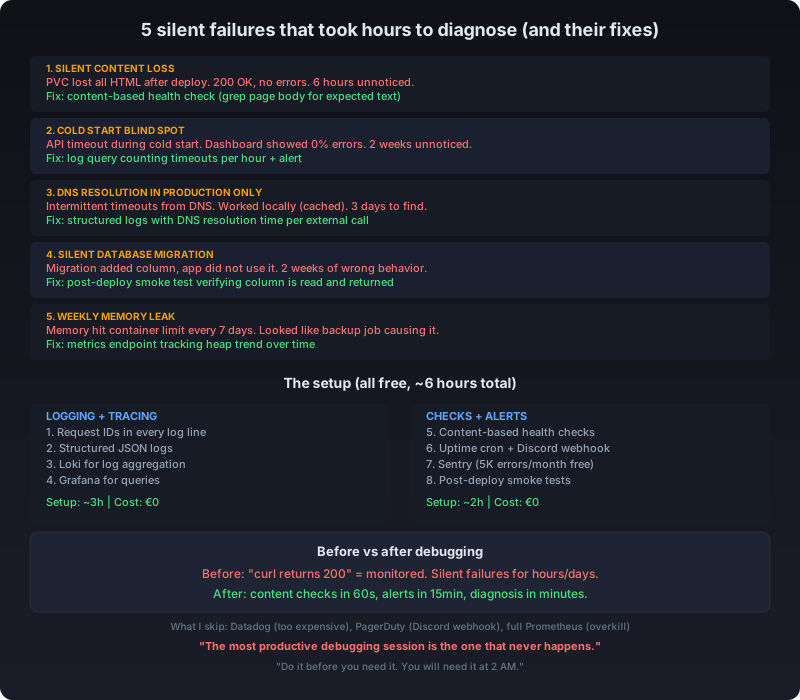
The silent content loss (my blog)
A k3s deployment triggered a rolling restart. The new pod started. Health checks passed. Every page returned 200.
But the PVC hostPath volume was empty. The dist folder had no HTML files, only _astro chunks and images. Caddy served 200 OK with empty body for every route.
No error in the logs. No failed health check. No alert. I found out 6 hours later.
The fix: A content-based health check that verifies actual page content, not just HTTP 200. More on this below.
The cold start blind spot
A serverless function had a 4-second cold start. When it happened, the API Gateway timeout (configured at 3 seconds) killed the request before the function even started.
CloudWatch showed “200 OK” for successful invocations. The timeouts were logged as “Task timed out” but buried in a log group with thousands of other lines. The dashboard showed a 0% error rate because timeouts are not errors in the default dashboard.
Users saw “Loading…” then an error message. We had no idea for 2 weeks.
The fix: A log query that counts timeouts per hour, with an alert when the rate exceeds 1%. Takes 30 seconds to set up in Loki or CloudWatch Insights.
The “works on my machine” DNS issue
An API worked locally but failed intermittently in production. The error was a DNS resolution timeout that happened maybe 1 in 100 requests.
Locally, the DNS resolved from cache. In production, the container’s DNS resolver had a short cache and a slow upstream. The failure was intermittent enough that restarting the pod “fixed” it (until the next cold DNS resolution).
Without request-level logging showing the hostname and resolution time, this looked like a random network issue. It took 3 days to find.
The fix: Structured logs that include DNS resolution time for external calls. The anomaly was obvious once the data existed: 99% of requests resolved in 2ms, 1% took 4+ seconds and timed out.
The silent database migration
A migration added a new column with a default value. The migration succeeded. The column existed. All existing rows had the default.
But the application code was not updated to read the new column. The API still worked, still returned 200, still showed data. It just silently ignored the new field for 2 weeks until someone noticed the migration was incomplete.
No error. No log entry. No alert. The system was “working” but not doing what it was supposed to.
The fix: A post-deploy smoke test that verifies the new column is actually being read and returned in API responses. Run it once after every deploy.
The memory leak that restarted on schedule
A Node.js process had a slow memory leak. Every 7 days, memory usage hit the container limit. The process restarted. The pod showed as “Running” the whole time.
The restart happened to coincide with the daily backup job. For 3 months, people thought the backup job was causing the restart. The real cause was a closure capturing an array that grew without bound.
During local testing, the process never ran long enough to hit the limit. In production, it took 7 days.
The fix: A metrics endpoint that tracks heap usage over time. The upward trend was obvious after 3 days of data. Without it, we never would have connected the weekly restart to memory.
The debugging infrastructure I actually use now
1. Structured logging with request IDs
Every request gets a unique ID. Every log line includes it. When something breaks, you grep one ID and see the entire request lifecycle.
app.use((req, res, next) => {
  req.requestId = crypto.randomUUID();
  console.log(JSON.stringify({
    level: 'info',
    requestId: req.requestId,
    method: req.method,
    path: req.path,
    timestamp: new Date().toISOString()
  }));
  next();
});
When you call another service, pass the requestId. When that service logs, it picks up the same ID. Suddenly you can trace a request across your entire stack.
For services that only have access logs (like Caddy), I added a script that parses for anomalies: 5xx spikes, slow responses, missing assets.
2. Health checks that actually check content
A health check that only verifies “the process is running” caught none of the failures above.
Now I use content-based health checks:
#!/bin/bash
# Verify a real page returns real content
RESPONSE=$(curl -sf http://localhost:30080/blog/stripe-alternatives-eu/ 2>/dev/null)
if echo "$RESPONSE" | grep -q "I was paying Stripe"; then
  exit 0
fi
exit 1
The check verifies that a real page returns real content. If the HTML files are missing, the health check fails. The pod gets restarted. No more 6-hour silent outages.
I run this check every 60 seconds. It is the most valuable 8 lines of bash I have written.
For the database migration issue, the health check also verifies:
# Verify the migration was applied AND the app uses it
curl -sf http://localhost:30000/api/migrations/status | grep -q "column_v3:active"
3. Uptime monitoring from outside the cluster
I use a cron job that hits the site from outside every 5 minutes. If it gets 3 non-200 responses in a row (or content does not match expectations), it sends a Discord message.
Cron: every 5 minutes
Action: GET https://my-site.com/blog/
Expected: 200 with content matching "Stripe alternatives"
On failure: POST to Discord webhook
Total cost: zero. Total setup time: 10 minutes. Total value: I know within 15 minutes if something is wrong, even if Kubernetes says everything is Running.
4. Error tracking with Sentry (free tier)
Free tier: 5,000 errors/month. For small sites, this is effectively unlimited.
Sentry catches:
- JavaScript errors on the frontend
- Unhandled exceptions on the backend
- Performance issues (slow API calls, timeouts)
The setup took 3 lines of configuration. Instead of “the site feels slow,” I get “Event processing took 4.2s on /api/checkout in Firefox 124.”
For the DNS issue, the timeout errors would have appeared in Sentry with the full stack trace and hostname.
5. Log aggregation with self-hosted Loki
Single-instance Loki container. Logs go to stdout, Promtail picks them up, Loki stores them. Grafana for queries.
For a single-server setup, this is arguably overkill. But here is what I use it for:
rate({job="web-article"} |= "error" [5m])
# Error rate over 5 minutes

{job="web-article"} |= "abc-123-request-id"
# Trace every log line for one request

quantile(0.95, rate({job="web-article"} | json | response_time > 0 [5h]))
# 95th percentile response time over 5 hours
The storage cost is maybe 200MB/month. The query capability replaces the kubectl logs --tail=5000 | grep ERROR | awk '{print $4}' workflow that turns a 5-minute investigation into a 30-minute one.
For the cold start timeouts, the Loki query would be:
{job="api"} |= "Task timed out" | json | response_time > 3000Run it once, see the spike, know the fix.
If self-hosted Loki is too much, even shipping logs to a file and using lnav is better than kubectl logs.
6. A metrics endpoint with content integrity checks
I added a /metrics endpoint that returns:
uptime_seconds 34560
requests_total 892
errors_total 12
last_deploy_timestamp 1717000000
content_files_expected 11
content_files_actual 11
last_content_check ok
It is not Prometheus. It is a JSON object I can curl. But when the PVC corruption happened, content_files_actual would have been 0. The health check catches it without me visiting the site.
For the memory leak, I added:
heap_used_mb 342
heap_limit_mb 512
memory_trend increasing
The memory_trend field compares the last 24 hours. If it is “increasing” for 3 days straight, that is a leak. Restart and investigate with heap snapshots.
7. Post-deploy smoke tests
After every deploy, a smoke test runs within 30 seconds:
1. GET / → expect 200 with "jguillaumesio" in body
2. GET /blog/stripe-alternatives-eu/ → expect 200 with "Stripe" in body
3. GET /metrics → expect content_files_actual == content_files_expected
4. GET /api/health → expect database connection = ok
If any check fails, the deploy is rolled back automatically. The entire test takes 20 seconds.
This caught the database migration issue (step 4 would have failed because the new column was not being queried). It caught the PVC corruption (step 3 fails). It would catch the cold start issue if the smoke test runs during a cold period.
The cost of all this
| Tool | Setup time | Monthly cost | Catches |
|---|---|---|---|
| Request IDs in logs | 1 hour | 0 | Tracing issues across services |
| Content-based health check | 30 min | 0 | Silent content failures |
| Uptime cron + Discord alert | 15 min | 0 | Downtime within 15 minutes |
| Sentry free tier | 30 min | 0 | Frontend + backend errors |
| Self-hosted Loki | 2 hours | ~0 (same VPS) | Error patterns, log queries |
| Metrics endpoint | 1 hour | 0 | Content integrity, deploy tracking |
| Post-deploy smoke tests | 30 min | 0 | Incomplete migrations, bad deploys |
Total setup time: ~6 hours. Total monthly cost: 0.
Compare that to the combined 2+ weeks of debugging time from the 5 silent failures above.
What I would not use
- Datadog / New Relic: Expensive for a small site. Sentry + Loki give you 80% of the value.
- PagerDuty: A Discord webhook is your pager at 3 AM. You do not need to pay $20/month.
- Full Prometheus + Grafana stack: One metric endpoint and a cron job is enough until you have real traffic.
- ELK stack: Loki is simpler. Do not add Elasticsearch just for logs.
The bottom line
I have been on both sides. Before: 5 silent failures, 6+ hours each, discovered hours or days after they started. After: content checks catch corruption within 60 seconds, alerts notify me within 15 minutes, and log queries make diagnosis take minutes instead of hours.
The most productive debugging session is the one that never happens because you caught the issue at deploy time. The second most productive is the one where you already have the data you need.
Set up logging with request IDs. Make your health checks verify content, not just process existence. Add uptime monitoring with alerts. Ship your logs somewhere searchable. Run smoke tests after every deploy.
Do it before you need it. Because you will need it at 2 AM, and that is not the time to be setting up log aggregation.