AI-generated infrastructure is a maintenance nightmare
I asked AI to generate Terraform for a standard AWS setup. It produced 2,400 lines that worked perfectly. Here's why I'd never deploy it to production.
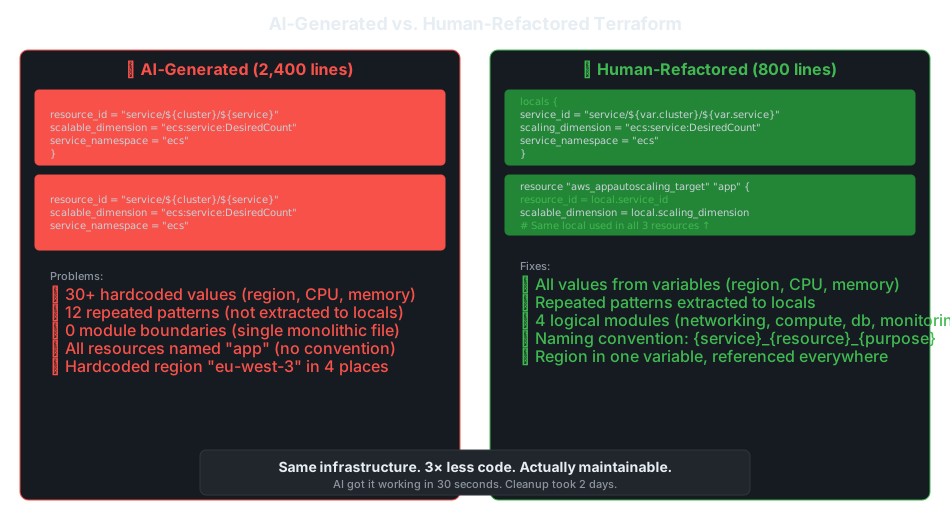
I asked ChatGPT to generate Terraform for a standard AWS setup: VPC, subnets, ECS cluster with Fargate, RDS, and an ALB.
It produced 2,400 lines of Terraform in about 30 seconds. I ran terraform plan. not a single error. Every resource configured correctly, security groups wired up, IAM roles scoped.
It was also a complete maintenance nightmare.
This is the dirty secret nobody in the “AI will replace developers” crowd talks about: AI-generated infrastructure code technically works but is structurally terrible. It’s the equivalent of duct-taping a bridge together. It holds cars, but you wouldn’t want to be underneath it.
The Real Terraform
Here’s a real excerpt from what the CPU^{O(bug)} produced:
# ECS Task Definition
resource "aws_ecs_task_definition" "app" {
  family                   = "app-task"
  network_mode             = "awsvpc"
  requires_compatibilities = ["FARGATE"]
  cpu                      = "256"
  memory                   = "512"
  ...
}

resource "aws_appautoscaling_target" "app" {
  max_capacity       = 10
  min_capacity       = 2
  resource_id        = "service/${aws_ecs_cluster.app.name}/${aws_ecs_service.app.name}"
  scalable_dimension = "ecs:service:DesiredCount"
  service_namespace  = "ecs"
}

resource "aws_appautoscaling_policy" "cpu" {
  name               = "cpu-scaling"
  resource_id        = aws_appautoscaling_target.app.resource_id
  scalable_dimension = aws_appautoscaling_target.app.scalable_dimension
  service_namespace  = aws_appautoscaling_target.app.service_namespace
  # ...
}

resource "aws_appautoscaling_policy" "memory" {
  name               = "memory-scaling"
  resource_id        = aws_appautoscaling_target.app.resource_id
  scalable_dimension = aws_appautoscaling_target.app.scalable_dimension
  service_namespace  = aws_appautoscaling_target.app.service_namespace
  # ...
}
Look at that. These four lines are copy-pasted across three resources:
resource_id        = aws_appautoscaling_target.app.resource_id
scalable_dimension = aws_appautoscaling_target.app.scalable_dimension
service_namespace  = aws_appautoscaling_target.app.service_namespace
Multiply this pattern across 2,400 lines and you have hundreds of lines of duplication that should be ONE locals {} block.
The Five Problems
1. No Locals, No Abstractions
A human engineer, even a junior one, would write:
locals {
  service_id        = "service/${aws_ecs_cluster.app.name}/${aws_ecs_service.app.name}"
  scaling_dimension = "ecs:service:DesiredCount"
  service_namespace = "ecs"
}
The AI doesn’t. Every resource is written from scratch, like it’s the first time anyone has ever wired these together. Because for the AI, it is the first time, every single time.
2. 30+ Hardcoded Values
Region: eu-west-3. CPU: 256. Memory: 512. Desired count: 2. ALB port: 443.
Every single one of these is hardcoded inline. Deploy to a different region? Edit it in 8 places. Change the instance size? Edit it in 12 places. Miss one, and you get a runtime error that’s 45 minutes to track down.
3. Zero Module Boundaries
The entire infrastructure (networking, compute, database, monitoring, DNS) lives in one flat directory. No modules. No separation of concerns. One file to rule them all.
For context, the same infrastructure in a real team project would be:
modules/
  networking/      # VPC, subnets, NAT, IGW
  compute/         # ECS, ALB, auto-scaling
  database/        # RDS, subnet groups, security
  monitoring/      # CloudWatch, alarms, dashboards
  dns/             # Route 53, ACM certificates
4. Everything Is Named “app”
resource "aws_ecs_task_definition" "app" { ... }
resource "aws_appautoscaling_target" "app" { ... }
resource "aws_appautoscaling_policy" "cpu" { ... }
resource "aws_appautoscaling_policy" "memory" { ... }
resource "aws_security_group" "app" { ... }
In a real project with 5 microservices, you’d have 5 resources all named app. Good luck debugging that in CloudTrail logs at 2 AM.
5. No Opinion About the Hard Stuff
Here’s what the AI didn’t ask:
- Should this RDS instance have Multi-AZ? (Costs 2×. Is it worth it for this use case?)
- What’s the backup retention policy? (The default is 7 days. Is that enough?)
- Should we use Aurora Serverless? (Depends on the workload pattern.)
- What about encryption at rest? (Probably yes, but need to think about key management.)
The AI generates the easy defaults for the hard questions. And it doesn’t even flag that those questions exist.
The Numbers
I spent two days refactoring the AI output into something I’d actually put in production:
| Metric | AI Output | After Refactor |
|---|---|---|
| Lines of code | 2,400 | 800 |
| Repeated patterns | 12 | 0 (locals) |
| Hardcoded values | 30+ | 0 (all variables) |
| Module boundaries | 0 | 5 logical modules |
| Naming convention | None | {env}_{service}_{resource} |
The refactor took 2 days. The AI generation took 30 seconds.
How I Actually Use AI for Infrastructure Now
I still use AI for infra. but I treat it like a junior developer who works fast and doesn’t ask questions:
1. Generate module skeletons, not full implementations
Bad: “Generate Terraform for ECS with auto-scaling” Good: “Generate a reusable ECS module that takes service_name, cpu, memory, and port as inputs. Output exactly: task definition, service, auto-scaling, and ALB target group. Use locals for repeated patterns. All naming via variables.”
2. Provide your conventions upfront
"Use these project conventions:
 - {env}_{service}_{resource} naming
 - All config from variables (region, cpu, memory, port)
 - Extract repeated patterns to locals
 - Group into modules: networking, compute, database, monitoring
 - Include .tfvars files for dev/staging/prod"
3. Run tflint and checkov on everything
tflint --recursive   # catches unused vars, deprecated syntax
checkov -d . --framework terraform   # security scanning
AI-generated code passes terraform plan but fails every linting rule. These tools catch what the AI misses.
4. Generate one perfect module yourself, then ask AI to replicate
Write your ECS module the way you want it. Then: “Generate an RDS module following the exact same structure, conventions, and input pattern as the ECS module I provided.”
One good example is worth more than a thousand prompts.
The Bottom Line
AI-generated infra is like a contractor who builds your house in code. The walls are up. The roof doesn’t leak. But the plumbing is all visible, the electrical isn’t up to code, and there’s no blueprint.
It works on day one. On day thirty, you’re paying the maintenance tax.
Use AI to draft. Then refactor like your future self, the one debugging this at 2 AM, depends on it. Because they do.